
Ahhh, websites: those showcases that too often turn into technical headaches instead of being true conversion machines. The reality is that when deciding to migrate to a new Content Management System (CMS) or starting from scratch, we seek the perfect balance: an aesthetic, high-performing site, but above all, a platform that we can manage ourselves without having to text our webmaster or agency every time we want to change a comma on our landing pages.
Of course, any conscientious entrepreneur or marketer will take the time to analyze their options before committing.
Here, we focus on the Odoo vs WordPress duel. Why? Because the majority of our clients come from the open-source world of WordPress with a ton of additional plugins, and because we know the Odoo Enterprise Resource Planning (ERP) ecosystem like the back of our hand.
Is Odoo similar to WordPress? Not quite, and that's where it becomes interesting for your operational efficiency.
Odoo website builder: how does it look like
The Odoo Website Builder is not just a simple page editor, it is a next-generation content management system (CMS) fully integrated into an ERP ecosystem. For an entrepreneur or marketer, this means you move from a static showcase to a dynamic platform where each building block communicates with your inventory, your CRM, and your accounting in real time.
The interface is built on ultra-smooth drag-and-drop technology that eliminates the need for coding in 90% of common use cases. You use predefined, easily editable blocks (snippets)—whether for banners, pricing tables, or contact forms—that you can move around intuitively. Unlike other solutions, images are automatically resized and optimized in WebP format to deliver faster loading speeds, a crucial factor for your SEO and user experience.
Here’s what changes the game with Odoo's tool:
- Real-time visual editor: You see exactly what your customers will see as you adjust columns, fonts, or animations.
- Native integration without plugins: No need to install third-party extensions to add a client portal, an appointment system, or an e-commerce store. Everything is already there, ready to be dragged onto the page.
- Automatic responsive design and visibility condition: Your site adjusts perfectly to mobile and tablet devices without any extra effort. Read here: reduction of display bugs YAY! If you want to add exclusive sections to your mobile design, just give it a condition.
- Advanced customization for professionals:If you have technical skills, Odoo provides you with two powerful tools directly in the interface: the custom code blocks to inject HTML and JS, and the custom CSS editor. These two approaches give you total flexibility for custom designs while staying within the framework managed by Odoo to avoid any conflicts during updates.
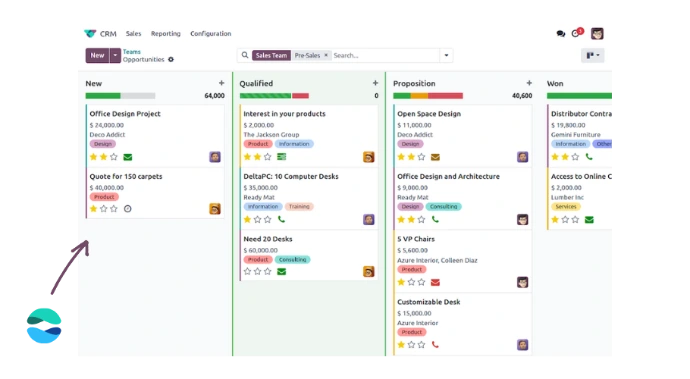
The major advantage lies in the Single Database: when a customer fills out a form on your site, the information can instantly create a sales lead in your CRM. It is this perfect synchronization that allows local SMEs to save a lot of time by avoiding double data entry between disconnected tools.
Odoo website, does it work?
Of course it works.
User rights management
Access control is often a source of stress, but with Odoo, it's "turnkey". Unlike WordPress, where sending login links and managing roles through third-party extensions can become unstable, Odoo offers a native and granular structure. You can precisely determine who can modify the site content without risking access to your accounting or inventory. It's simple, secure, and, above all, it doesn't glitch when it's time to add a collaborator as a user.
SEO optimization
On the side of SEO optimization, Odoo has made giant strides and now covers the technical fundamentals without flinching. Let's be frank: WordPress maintains a lead thanks to its ecosystem of plugins like Yoast SEO or Rank Math, which offer granular semantic analysis and real-time suggestions that are not yet natively found in Odoo. However, for an entrepreneur who wants a high-performing site without becoming an expert in metadata, Odoo offers a 'clean' and efficient structure.
Since version 19, Odoo has taken an important step with the integration of AI in SEO optimization. With just one click, the platform analyzes your page content and automatically generates your metadata, keywords, and optimizes your links and images, all without you having to manually write any tags.
The platform natively integrates the essential tools to please Google's algorithms. You can directly modify the SEO titles and meta descriptions of each page without going through a complex menu. Odoo also automatically generates your file sitemap.xml and your robots.txt, critical elements for indexing that WordPress often requires to be configured via an additional plugin. Moreover, the URLs are optimized to be 'human-readable', which helps both the visitor and the search engine understand the content of the page.
Here’s what you can directly manage in Odoo to boost your visibility:
- Open Graph tag management: Customize the appearance of your links when shared on LinkedIn or Facebook directly from the editor.
- Native Google integration:Odoo centralizes your essential Google tools directly from the administration interface. Connect Google Analytics 4 to track your visitors' behavior, Google Search Console to monitor your indexing and search performance, and starting from version 19, Google Merchant Center to automatically sync your product catalog. All of this, without third-party plugins or complex technical setup.
- Promotion Tool (Promote): Odoo offers a built-in tool that suggests keywords based on actual searches, helping you adjust your content to better meet search intentions.
- Simplified 301 Redirects: If you move a page or change a product name, Odoo often handles the redirect automatically, thus avoiding 404 errors that harm your SEO authority.
- Speed and WebP: As mentioned above, automatic image compression to WebP and minification of CSS/JS files are natively managed, improving the Core Web Vitals score, a major ranking factor.
In summary, while WordPress excels in the realm of micro-editorial optimization and advanced technical flexibility (such as complete control over complex schema markup), Odoo wins on stability. It is a robust, integrated SEO solution, and above all, requires no constant technical maintenance.
Theme and Design Customization
Customizing the look of your site with Odoo is "no nonsense." Everything happens in a centralized design tab: you change your fonts (H1, H2, etc.), colors, and visual styles once, and the change applies throughout the site. This guarantees a consistent brand image effortlessly.
The real advantage for saving time? The saving of custom blocks. If you create a perfect section for your services or testimonials, you save it and reuse it on any other page with a simple drag and drop. It’s like building your own custom design kit that brings your theme to life without ever touching the code.
And WooCommerce in that?
If you are determined to keep your WooCommerce store while enjoying the power of Odoo, that's where the magic of the API comes into play. Simply put, connecting WooCommerce to Odoo is like building a solid bridge between your sales showcase and your management engine.
The process of linking WooCommerce to your ERP relies on a connector that uses the WooCommerce REST API. Specifically, every time a sale occurs on WooCommerce, the API sends the information to Odoo. The result? Your WooCommerce order automatically creates a sale order in Odoo, without you having to lift a finger.
Here’s how it works for WooCommerce and Odoo to communicate:
- Stock synchronization: As soon as an item is sold on WooCommerce, Odoo updates the inventory and sends the information back to WooCommerce to avoid selling what you no longer have.
- Customer management: Your WooCommerce customer data is pushed to Odoo's CRM for finely-tuned marketing follow-up.
- Accounting automation: The invoice generated by WooCommerce is synchronized with your Odoo accounting, eliminating double entry (and end-of-month errors).
It is an effective solution if you love the WooCommerce interface but need the brain of Odoo to manage logistics. However, keep in mind that maintaining this link between WooCommerce and Odoo requires monitoring updates to prevent the bridge from breaking. If you want 'no nonsense', the native integration of Odoo eCommerce remains the smoothest choice, but the option to 'plug' WooCommerce via API is an alternative for entrepreneurs who do not want to give up their WordPress platform.

Ultimately, Odoo website vs WordPress
In the end, you don't choose Odoo for just one of its many features. You choose Odoo for its possibilities and overall functionality: efficient, connected, and integrated.
Whether you have an e-commerce site or just want to use your site as a showcase, Odoo website offers peace of mind with connectivity, without adding plugins, without the technical hassle of WordPress, without the headache.
Version 19 takes e-commerce even further. Odoo has massively strengthened its e-commerce module with concrete improvements designed for merchants:
- a rethought and smoother shopping experience,
- simplified product variant management,
- more flexible payment and delivery options,
- even deeper synchronization with inventory,
- real-time accounting.
All of this, without having to juggle between WooCommerce, a payment plugin, a stock plugin, and three performance extensions. With Odoo 19, your online store and back office are one.
Frequently asked questions
Here are some frequently asked questions about Odoo and WordPress.
Where WordPress often requires juggling with third-party extensions to add a CRM or a store, Odoo centralizes everything in a single database, automatically synchronizing your sales, inventory, and customer data without any technical "fiddling."
Odoo is a tool that connects the entire life of the business to the site. Therefore, its disadvantages in web design often do not outweigh the number of advantages it can generate for your organization.
- Limited visual customization: Fewer themes and graphic flexibility than WordPress if you do not touch the source code.
- Reduced extension ecosystem: Much fewer third-party plugins available for ultra-specific niche functionalities.
- Initial learning curve: The business-oriented interface may seem more complex than a simple blogat first.
- Dependency on the ERP: Less relevant if you do not use the other Odoo modules, as its strength lies in the overall infrastructure.