
Getting started with designing your website in Odoo
There are several major families of tools for creating a website :
- no-code builders (Wix, Squarespace),
- CMS (WordPress),
- SaaS (Webflow)
- e-commerce platforms (Shopify, PrestaShop),
Most are general-purpose tools, effective for showcases or standalone online stores. But if your business is already running on Odoo, there is a fourth way: Odoo Website Builder, a site builder directly integrated with your ERP.
Unlike other solutions, your site is not an isolated showcase. It is connected in real-time to your product catalog, your CRM, your inventory, and your contact forms. For a small to medium-sized enterprise that wants to avoid fragile synchronizations and tools that do not communicate, this is a considerable advantage.
This guide walks you through step by step to get started with Odoo Website Builder: structure, theme, key pages, best practices — without unnecessary jargon.
Odoo Website Builder VS other website creation tools
To make a good choice, you need to know where Odoo stands compared to the most popular solutions on the market:
| Tool | Type | Ideal for | ERP Integration |
|---|---|---|---|
| Wix / Squarespace | No-code builder | Showcases, portfolios, beginners | ❌ None |
| WordPress + Elementor | Flexible CMS | Blogs, scalable sites, agencies | ⚠️ Via third-party plugins |
| Shopify | E-commerce platform | Dedicated online stores | ⚠️ Limited |
| Webflow / Framer | Advanced no-code for designers | Premium sites, agencies | ⚠️ Via third-party plugins but sometimes none |
| Odoo Website Builder | Integrated ERP builder | SMEs under Odoo, connected sites | ✅ Native and complete |
Odoo Website Builder is not a general-purpose tool. It is the best option if your business already uses Odoo for its management (CRM, inventory, billing), as it removes any friction between your site and your operations.
Who is Odoo Website Builder for?
Odoo Website Builder is for you if:
- Your business already uses Odoo (or plans to do so)
- You want a site connected to your CRM, your inventory, and your sales
- You are an SME that wants to avoid managing multiple tools in parallel
- You do not have a dedicated web developer and prefer an integrated no-code solution
Odoo Website Builder is less suitable if:
- You do not use Odoo ERP and do not plan to do so
- You need a very large template ecosystem (Wix, Squarespace will be more suitable)
- Your site is primarily a content blog (WordPress is still more powerful for that)
Define the structure of your site
Before opening any editor, ask yourself this question: what pages do I really need?
For a small business, the minimal structure usually looks like this:
- A homepage that clearly explains who you are and what you do
- A services or products page
- An About page that humanizes your business
- A contact page with a functional form
- Possibly a blog if you want to publish content regularly
Defining this hierarchy on paper before you start will allow you to build a coherent site, with logical navigation for your visitors.
Choose and configure your theme
Odoo offers a selection of visual themes, both free and paid. The choice of theme is not trivial: it determines the overall appearance of your site, but also certain features available natively.
A few tips for making a good choice:
Prioritize simplicity
A clean theme that matches your brand image is better than a theme loaded with visual effects that slows down your site. Your visitors want to find information quickly.
Think mobile from the start
More than half of web traffic today comes from phones. Check the mobile appearance of your theme before committing.
Do not choose based on the demo
The demo of a theme is always filled with beautiful photos and perfect content. Just imagine what it will look like with your own content, your real images, your real descriptions.
The theme as the control center of your visual identity
Once your theme is installed, Odoo provides you with a centralized control panel, accessible directly from the site editor, which acts as the visual hub of your entire website.
This is where you define once and for all the fundamental elements of your brand identity:
- The colors : primary color, secondary color, color of texts, backgrounds, and buttons
- The fonts : the typography of your headings and your body text
- The roundness : the level of roundness of your buttons and blocks, a detail that greatly changes the visual personality of a site
- The spacings : the overall breathing space between elements
What makes this approach particularly powerful for a small business is that any change made in this panel is instantly reflected across all pages of your site. You change your primary color? Every button, every colored heading, every banner across the site updates automatically. You change the font? All your texts switch with a click.
Specifically, this means two important things. First, you do not need to modify each page one by one when you want to refresh your image, which represents a huge time saver in the long run. Second, your site remains visually consistent by design: it is impossible to have one page with a red button and another with a blue button because you forgot to synchronize.
For SMEs that do not have a dedicated marketing department, it is a guarantee of professionalism without extra effort. So take the time to properly configure these settings from the start, with colors true to your graphic charter, readable fonts, and sufficient contrasts, and let Odoo do the rest.
Set up your domain name
If you do not have a domain name yet, now is the time to take care of it. Odoo allows you to connect an existing domain or buy one directly from the platform. A clean domain, like votreentreprise.com, is essential to appear professional and for your online visibility.
Building your pages:
the good habits to adopt
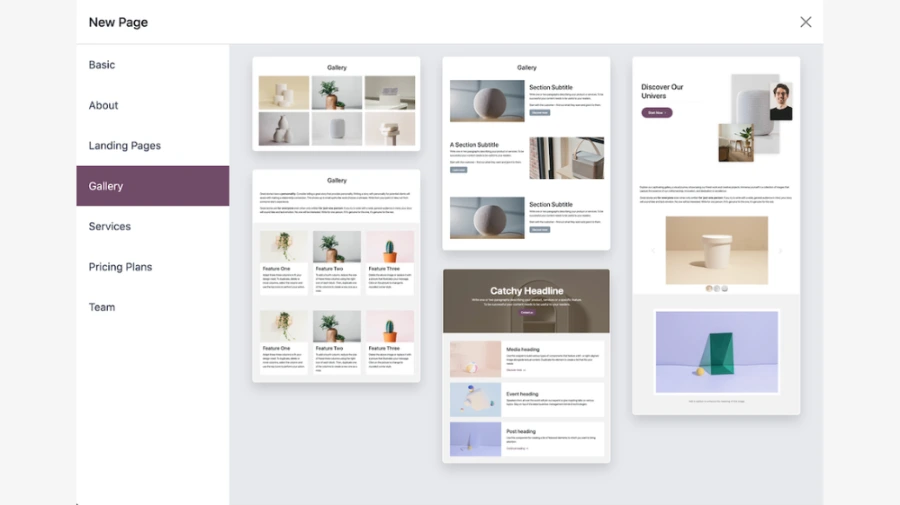
Odoo's page builder is a no-code tool that works with blocks. You add sections, columns, images, text, and buttons through an intuitive drag-and-drop interface — without writing a single line of code. This no-code approach allows any member of your team to create and update the site independently. However, a few basic rules make a big difference.
Write for your clients, not for yourself
This is the most common mistake among SMEs building their first website. We tend to talk about ourselves, our story, our values, our expertise, without answering the real question your visitor has when arriving at your site: can this company help me with my problem?
Each page must answer this question quickly and clearly. Your homepage should explain in two sentences what you do and for whom. Your services page should highlight the benefits for the client, not just the technical features of what you offer.
Care for the homepage
The homepage is your first impression. A visitor who does not understand what you do in the first few seconds will leave. It should contain:
A clear main message at the top of the page (what is called the "hero") that summarizes your value proposition in one sentence. Something like "Custom furniture manufacturer for workspaces in Quebec" is infinitely more effective than "Welcome to our site."
A services or products section that gives a quick overview of what you offer, with links to detailed pages.
Trust elements : customer testimonials, partner logos, certifications, years of experience. These elements reassure the visitor who does not know you yet.
A clear call to action : a "Contact Us", "Request a quote" or "View our products" button that is clearly visible, without your visitor having to search for how to reach you.
Structure the content with headings (h1, h2, h3)
Each page should have a logical hierarchy of headings. A main title that identifies the subject of the page, subtitles to organize the sections, and body text for the details. This structure helps your visitors navigate the content quickly, and it also helps search engines understand what each page is about.
In the Odoo editor, you control these heading levels directly in the text formatting bar.
Optimize your images
Images are often the weak point of SME websites. Either there are not enough, or they are too heavy and slow everything down. Odoo automatically compresses uploaded images, which helps, but some best practices are necessary on your part:
- Use real photos of your team, your premises, your products. Stock photos give a cold and inauthentic impression.
- Name your images descriptively before uploading them (equipe-atelier-menuiserie.jpg rather than IMG_4521.jpg).
- Always fill in the alt text for each image in the editor, a short description of what the image shows.
Activate the right features, according to your needs
Odoo Website is not limited to static pages. Depending on your business, several add-ons can transform your site into a real business development tool.

The blog
If you want to share news, tips, or in-depth articles, the Odoo Blog module is directly integrated into the website builder. Publishing content regularly is one of the most effective ways to attract visitors to your site in the long term. A well-written article that answers a common question from your customers can continue to bring you traffic for years.

Forms and lead captures
The Forms module allows you to create contact, submission, or registration forms and place them on any page. Each submission automatically creates an opportunity in your Odoo CRM, eliminating the need to manually transfer requests received by email.

Live chat
Odoo integrates a live chat feature that can be activated on your site. For a small business that receives qualified visitors, it is an effective way to convert a hesitant visitor into a potential customer, directly from the navigation page.
The most common mistakes to avoid
After assisting many small businesses with their Odoo deployment, certain mistakes consistently recur. Here are the main ones.
Publishing the site too early
Impatience is understandable, but a site with empty pages, placeholder text, or missing images harms your credibility. Take the time to finalize the essentials before going live.
Ignoring the mobile version
The Odoo editor offers a mobile preview mode: use it for every important page. What looks perfect on a large screen can become unreadable on a phone.
In most cases, Odoo automatically adapts the content for both formats. However, some sections need to be adjusted or displayed conditionally based on the version to ensure a professional rendering, both on a large screen and on mobile.
Put the site online and leave it alone
A website is not a static document. It must evolve with your business, reflect your new services, showcase your recent projects. Plan for regular revisions, at least once a quarter.
Neglect the contact page
It is often the most visited page of a small business website. It should be simple, complete, and reassuring: address, phone number, email, form, and why not a map. Do not treat it as a secondary page.
Copy-paste content from elsewhere
Whether from a competitor or an old site, duplicated content is penalized by search engines and does not reflect your true identity. Take the time to write content that represents you.
A website that works for you
Getting started with Odoo Website Builder means understanding that your site is not a digital brochure. It is a full-fledged business development tool, and the fact that it is connected to your ERP gives it a significant advantage over most market solutions.
The method is simple: define your structure before building, write for your clients rather than for yourself, pay attention to visual and technical details, and treat your site as a living asset that you evolve over time.
SMEs that make the best use of Odoo Website are not necessarily those with the most visually impressive site. They are the ones with a clear, coherent, connected, and regularly updated site, a site that accurately reflects their expertise and encourages visitors to get in touch.
And if you need a helping hand to get started on the right foot, that's exactly the kind of support we offer.
Frequently asked questions
Here are some common questions about website design.
Odoo Website Builder is an excellent tool for businesses already equipped with Odoo ERP. It offers a no-code drag-and-drop interface, a catalog of professional themes, and a native connection to your data (CRM, inventory, contact forms). Its distinctive advantage: any change made in your back office (new product, stock update) is automatically reflected on the site, without manual synchronization.
On the other hand, if you are not using Odoo for your business management, tools like Wix, Squarespace, or WordPress offer a gentler learning curve and access to broader ecosystems of templates and plugins.
Odoo Website Builder, on the other hand, is natively integrated into the entire Odoo ecosystem. Leads generated through your forms go directly into your CRM. Your products are synchronized in real-time with your online store. It's a unified system, with no friction between your site and your operations — a major advantage for SMEs looking to gain efficiency.
Website design goes through a few fundamental steps: defining your goals and target audience, establishing the page hierarchy, choosing a platform suited to your needs and technical knowledge, and then working on the web design in line with your visual identity.
Once the structure is in place, you write the content for each page with user experience (UX) and search engine optimization (SEO) in mind, particularly by integrating the right keywords. Then comes the testing phase: smooth navigation, mobile version, loading speed.
Depending on your industry, you can manage this project yourself using a website builder like Odoo, or entrust your project to a web agency for personalized support. A well-designed professional website from the start will save you costly corrections in the long run.
The budget to anticipate varies significantly depending on the complexity of the project and the chosen solution. Here are the main ranges observed in 2026 in the Canadian market :
- Self-service builder (Odoo, Wix, Squarespace) : between $0 and $50/month, depending on the plan. Ideal for a freelancer or a small business with simple needs.
- Freelancer or web agency for a showcase site : between $1,500 and $5,000, depending on the number of pages and features.
- Complete site with online store : prices generally start around $5,000 and can exceed $20,000 for a complex e-commerce project.
In addition to these initial costs, recurring fees apply: hosting, SSL certificates, maintenance, and updates. Expect to spend between $500 and $2,000 per year to keep an existing site running smoothly.
Platforms like Odoo, Wix, Squarespace, or Google Sites allow you to launch a site without spending a single dollar. These tools rely on an intuitive interface and ready-to-use templates, accessible without any development knowledge.
The trade-off is real: the free version usually displays the platform's name in your URL and sometimes includes ads. For a business that wants to project a professional image, this compromise can harm its credibility.